Posts

Using an Async Iterator in Typescript

I have been experimenting with async iterators in Typescript. One area these could be useful is in simplifying the code for forms, specifically handling button presses. Currently, I create forms programmatically using my form class, which creates Bootstrap modal forms. "Action buttons" are the buttons that sit in the modal-footer area. When creating "ActionButton"s to add to the form an onClick handler is specified and the form takes care of calling onClick() when the button is clicked. Here's a trivial example - an About box with an Ok button and second button just for testing. export function about(): void {   let aboutBox = new forms.Form( `About ${app.productName}` );   aboutBox.addButton(   {     name: 'Ok',     onClick: ()=>     {       aboutBox.close();     }   } );   aboutBox.addButton(   {     name: 'Test',     tooltip: 'Test ...
Windows FILETIME to Javascript Date

In case you ever care about this ... /**    * fileTimeToDate()    *    * Convert a Windows FILETIME to a Javascript Date    *    * @param {number} fileTime - the number of 100ns    * intervals since January 1, 1601 (UTC)    * @returns {Date}    **/   function fileTimeToDate( fileTime ) {    return new Date ( fileTime / 10000 - 11644473600000 );   };

How Corpse Bride was made.

Jonathan Lucas Unveils His Editing Secrets on 'Corpse Bride,' the First Stop-Motion Animation Feature. Previously the article was found here: http://www.editorsguild.com/newsletter/JulAug05/julaug05_bride.html However that link is dead - the article is now here: https://www.editorsguild.com/Magazine.cfm?ArticleID=110

Localised Date & Time in Javascript

I want to display a date & time string that's formatted correctly depending on the viewer's locale. Question: can I rely on the javascript Date object's locale-specific string functions ? Answer: yes, but only if I don't care what it looks like or how many characters are in the string. Here's the result of my testing: toLocaleString() FF15:     "Tue Jul 14 14:37:05 2009" Chrome21: "Tue Jul 14 2009 14:37:05 GMT+1200 (NZST)" Safari6:   "14 July 2009 2:37:05 PM NZST" IE10:   "Tuesday, 14 July 2009 2:37:05 p.m." toLocalDateString() + ' ' + toLocaleTimeString() FF15:     "07/14/2009 14:37:05" Chrome21:   "Tuesday, July 14, 2009 14:37:05" Safari6: "14 July 2009 2:37:05 PM NZST" IE10 "Tuesday, 14 July 2009 2:37:05 p.m." Could they be any more different ?

Canon dissing Mac users

Dear Canon - Fuck you, could you possibly be more inept ? Not only have you failed to supply OS X Lion drivers for my Canon printer (CP400), or in fact ANY printer from that range (the otherwise awesome dye sublimation range of printers) - but your webpage "Mac OS X Lion Compatibility List", provided explicitly for Mac users, DOESN'T FUCKING WORK IN SAFARI. Honestly, could you care any less about Mac users? So, here's my promise; I will no longer buy Canon print products until there's at least a hint of caring a damn. When was Lion release ... was it about 10 months ago now ... and you would have had dev builds months before that ... so, do you have more than just the one Mac developer ?

Do NOT use the Flickr uploader in Aperture 3.01

Image
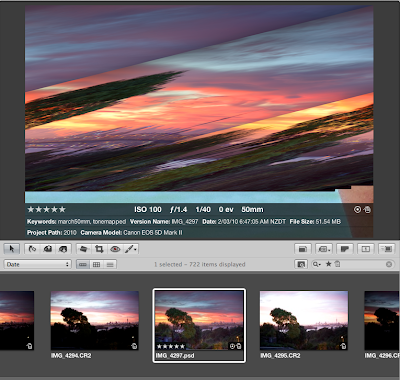
What a fuckin' disaster - Apple you bunch of twits ! Aperture 3 is a step forward in many ways but the Flickr uploader that comes built in was clearly the work of the junior member of the Aperture dev team. Oh, this will be easy, let's give it to Joe - he has no experience but it's only a bloody file uploader he can't screw it up too badly. Wrong. Joe fucked it up !!  So, having selected an image to upload, I click the Flickr button in the tool bar - the tooltip for the button is "New Flickr Album". It creates an Album in my Aperture Library which it synchronizes with Flickr. Great - the image uploaded. However, if I then modify the image metadata in Flickr itself (which is what I would normally do) - like give the image a new name - it get's out of synch with the Flickr Album in Aperture and the image disappears from the album. Ok, I think to myself. I'll name the image version in Aperture, and set the keywords in Aperture too - great, these things ...

Scripted use of HandBrake to re-encode video

My workflow for importing media from my cameras reflects the fact that video is just as important to me as still images, and beginning to dominate in terms of storage needs. Which is saying a lot considering that I have a Canon 5D Mk2 and take a lot of RAW images which are over 30MB each. Video originates mainly from my family's 2 point & shoot cameras - a Canon Powershot TX1, and my new (awesome summer camera) Canon D10, and to a lesser degree from the 5D Mk2. Generally, the video is generally not particularly high quality - it's family orientated stuff that we really want to keep but doesn't need to be, for example, a 1080p 40Mb/s stream. So, I want to re-encode the footage to reduce my storage needs. In the case of video from the point & shoot cameras - I am well served by the "Universal" preset available in HandBrake (yes, I have an AppleTV), i.e. there' no noticeable quality loss but often storage is only 1/3 of the original. For footage from t...