Wednesday, March 10, 2010

Do NOT use the Flickr uploader in Aperture 3.01
What a fuckin' disaster - Apple you bunch of twits !

Aperture 3 is a step forward in many ways but the Flickr uploader that comes built in was clearly the work of the junior member of the Aperture dev team. Oh, this will be easy, let's give it to Joe - he has no experience but it's only a bloody file uploader he can't screw it up too badly. Wrong. Joe fucked it up !! 

So, having selected an image to upload, I click the Flickr button in the tool bar - the tooltip for the button is "New Flickr Album". It creates an Album in my Aperture Library which it synchronizes with Flickr. Great - the image uploaded. However, if I then modify the image metadata in Flickr itself (which is what I would normally do) - like give the image a new name - it get's out of synch with the Flickr Album in Aperture and the image disappears from the album. Ok, I think to myself. I'll name the image version in Aperture, and set the keywords in Aperture too - great, these things synch to Flickr, and the keywords become Flickr tags.

At this point I'm not completely comfortable with the two-way nature of the link between Flickr and Aperture but it seems to work.

So, one day I use the Aperture auto-stack feature and inadvertently auto-stack more photos than I had intended - but it's no problem, they all needed stacking ... oh oh, what the fuck's happened to my Flickr page! The auto-stacking in Aperture created stacks that contained previously published-to-flickr photos - and the photo I had published was not the pick of the stack (the first photo in the stack) - so Aperture deleted the published picture and started publishing the pick. All of the comment history and favorites for my published photos disappeared in a blink. So, I set the correct photos to be the picks and they were re-published but all of the history is still lost.

So - do NOT use the Flickr uploader that comes with Aperture. It is poorly conceived and implemented and I rue the day that I used it.

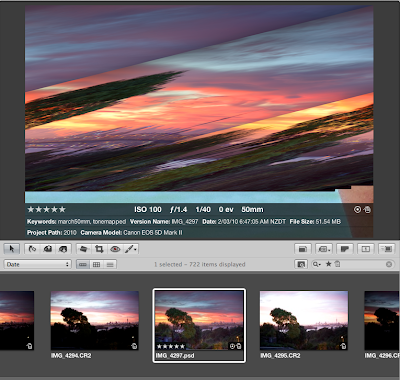
Also, while I am bitching about Aperture 3 - it doesn't seem to handle psd file contents properly. See below - how the expanded image is at odds with the thumbnail. This has happened to every PSD file I have added (or that was generated by the Photomatix plug-in). What is going on Apple?